
Platform
Two engines. One platform.
Sales Force Automation runs the field. Distribution Management runs the depot. Both write to the same live data.
Sales Force Automation
A rep’s day, fully visible.
From the first check-in to the last order — every step is captured on the phone and visible to managers.
- 09:00
Check in
Attendance starts the day. Today’s route and outlets appear.
- 09:20
Visit
Geo check-in at each outlet. Order or no-order — with a reason.
- 11:45
Order
SKU-wise orders with offers applied. Works offline.
- 14:30
Shelf check
Stock on the shelf, competitors, photos and notes, tagged to the outlet.
- 18:00
Close day
Mandatory day close. Every visit and order is final.
Everything inside SFA 15 modules
Plan
Master data & setup
One set of rules for every rep and every report.
- Products and SKUs, grouped by brand, category and focus items
- Outlet master by type, class, territory and status
- New outlets registered with approval
- Distribution points, staff profiles and role-based access
Routes, beats & tour plans
No missed outlets, no random visits.
- Daily, weekly or monthly route plans
- Outlets assigned to every route
- Tour plan scheduling
- Planned vs actual route tracking
Targets
Performance reviews built on data, not opinion.
- Sales targets by value or volume
- Focus product targets
- Visit coverage targets
- Achievement tracked against every target
Trade offers & promotions
Set once, applied the same way everywhere.
- Promotions and offers set up centrally
- Offers considered as the order is taken
- Offer impact carried into delivery and reports
In the field
Attendance & day close
No activity outside visibility. No day ends unreported.
- Start-of-day check-in
- Mandatory end-of-day close
- Working-day confirmation
Outlet visits
Every visit becomes auditable market data.
- Time-stamped visit start and finish
- Order or no-order, with a mandatory reason
- Stock, competitor and merchandising checks
- Visit notes on market feedback and issues
Field orders
No paper orders, no re-entry at the depot.
- SKU-wise order entry with quantities
- Offers considered on the order
- Order notes
- Works offline, syncs when back in signal
Activity & location
Execution quality without micromanagement.
- Location-verified check-in and check-out
- Geo-tagged photos
- Route compliance tracking
- Location tagging set by company policy
Order to delivery
Order review
Only valid orders move into delivery.
- Orders visible at the distribution point
- Checked for completeness
- Partial supply and reschedules handled
- Grouped by route or delivery run
Delivery & dispatch
Traceable from order to delivery.
- Challan (delivery note) created
- Loadsheet prepared
- Dispatch and delivery status tracked
- Reasons for failed or partial delivery
Stock & inventory
Delivery promises the godown can keep.
- Primary stock received
- Stock issued on dispatch
- Available stock always visible
- Adjustments only with a reason
Claims & replacement
No unrecorded losses.
- Damage and return claims
- Claims batched together
- Approval workflow
- Replacement or credit
Reports & admin
Reports & analytics
Leaders decide on facts, not follow-up calls.
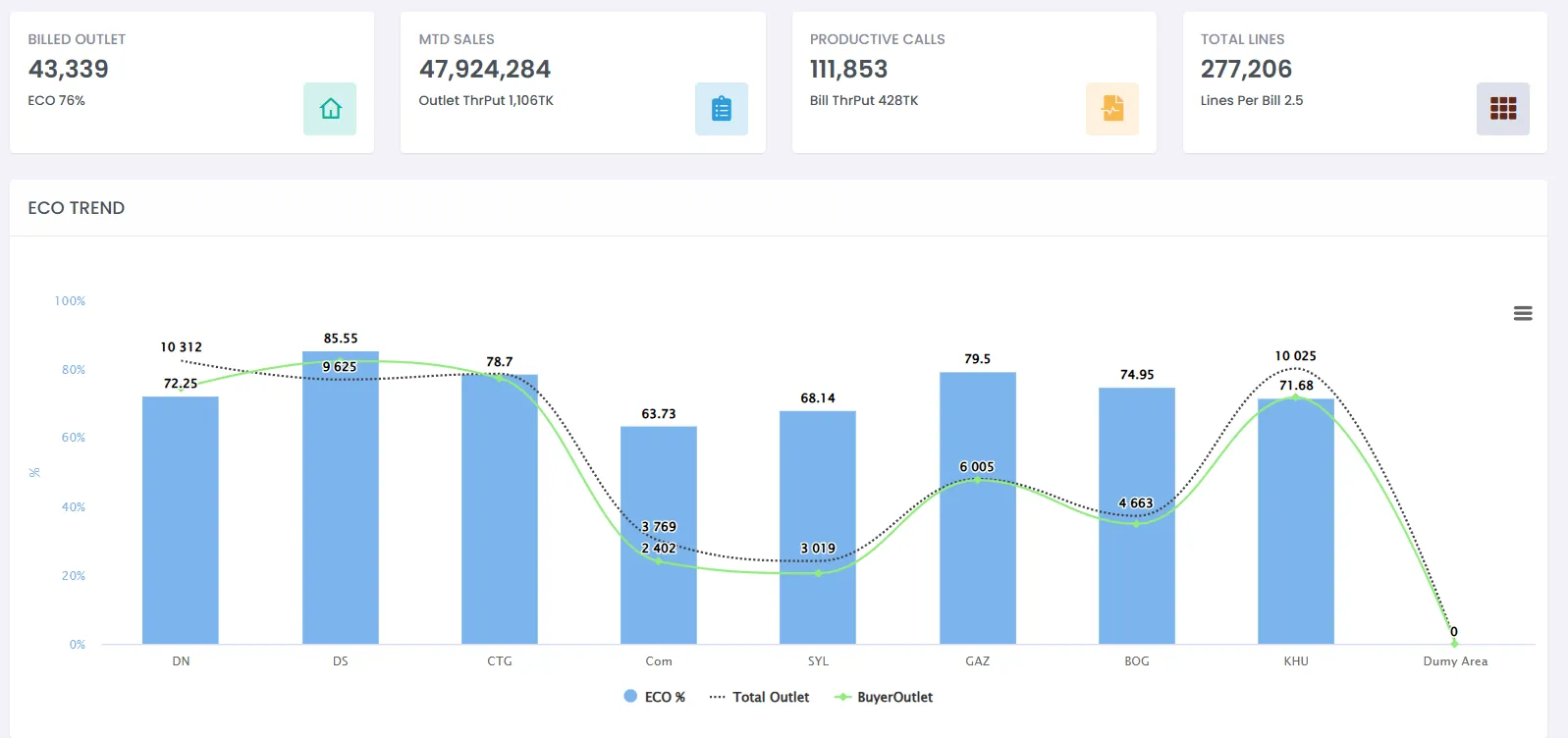
- Live dashboard: billed outlets, productive calls, ECO
- Sales by date, territory, route, outlet, SKU and rep
- Order vs delivery performance
- Pending and partial orders
- Target vs achievement
- Distribution efficiency
- Claims and loss analysis
- Attendance and productivity
- Expense summaries
Expenses & leave
Field admin in the same app.
- Field expense entry
- Expense review by policy
- Leave requests
- Approval workflows
E-learning
Learning content for field reps.
- Every outlet visit is recorded
- Every order is traceable
- Every delivery is accountable
- Every salesperson is measurable
- Every decision runs on real data
Distribution Management
Stock that matches the shelf.
Everything after the order — depot control, challans, dispatch, delivery, returns and reconciliation — without manual registers.
- 1Order received
- 2Reviewed
- 3Challan
- 4Dispatched
- 5Delivered / returned
- 6Stock updated
- 7Reported
Everything inside DMS 16 modules
Network & control
Distribution houses
Every house runs on its own, on the same process.
- Create and run many distribution houses
- Operators and staff per house
- Reps, routes and outlets linked to each house
- House-specific operating scope
Staff & responsibilities
Clear ownership, fewer errors and disputes.
- Operators, loaders and support staff assigned
- Reps mapped to their house
- Control who processes orders, makes challans or adjusts stock
Outlet & route mapping
The right house serves the right outlets.
- Approved outlets mapped to routes
- Each route assigned to one house
- No orders leaking across houses
Roles, approvals & audit
Enterprise governance without the complexity.
- Role-based access
- Approvals for sensitive actions
- Full transaction traceability
- Audit-ready logs
Orders & delivery
Order control panel
Always know what came in and what is pending.
- Orders by date, route, outlet and rep
- Filter by new, processed, delivered or pending
- Search and open any order fast
Edits & cancellations
Flexible, without losing the audit trail.
- Controlled edits for genuine corrections
- Cancellation with a recorded reason
- Duplicate orders prevented
Challans
The single source of truth for dispatch.
- Generated from processed orders
- Dispatch quantities calculated automatically
- One or many orders per challan
- Print-ready formats
Dispatch & delivery
Fewer loading mistakes. No arguments after delivery.
- Loadsheet planning by vehicle or route
- Dispatch confirmed before goods leave
- Full, partial and failed deliveries, with reasons
- Returns recorded at delivery
Stock & claims
Live inventory
Stock that reflects the godown, not assumptions.
- Real-time balance per house
- Auto-reduced on dispatch, adjusted on return or damage
- Opening stock setup and upload
- Manual changes only with remarks
Short stock & reprocessing
Work keeps moving when stock runs short.
- Shortages handled while making challans
- Partial fulfilment with balance tracking
- Reprocessed once stock arrives
Primary purchase & receiving
Inbound stock tracked as tightly as outbound.
- Primary purchase entries
- Primary stock receiving
- Primary challan adjustments
- Deposit tracking, where used
Claims & replacement
Losses recorded and recovered in the open.
- Damage and return claims
- Batched and grouped
- Replacement or credit tracked
- Claim status always visible
Schemes & reports
Schemes & pricing
Trade schemes applied correctly, every time.
- Scheme and promotion setup
- Applied to orders automatically
- Reflected in delivery and reports
Operations & stock reports
What is pending, partial or short, by route and house.
- Order vs delivery status
- Pending and partial deliveries
- Route-wise and house-wise performance
- Current stock and movement history
- Damage and return summaries
Management reports
Fact-based control, not phone updates.
- Sales vs delivery
- Loss and shortage analysis
- Distribution house productivity dashboards
Expenses & leave
Basic admin inside the same system.
- Expenses captured by category (optional module)
- Leave applications and summaries
Live stock per distribution house
Four kinds of stock. Always reconciled.
- Saleable
- Booked
- Returned
- Damaged
Auto-reduced on dispatch, auto-adjusted on return or damage. Every manual change needs a reason.
Super–sub distribution
DealerLink connects every layer.
For brands that sell through super distributors and sub-distributors. Field orders reach the right sub-distributor instantly, and stock is tracked at both layers.
- Field reps
- Super & sub distributors
- Delivery teams
- Managers
- Back office & finance
Each role sees only what it needs.
Read the Nabil story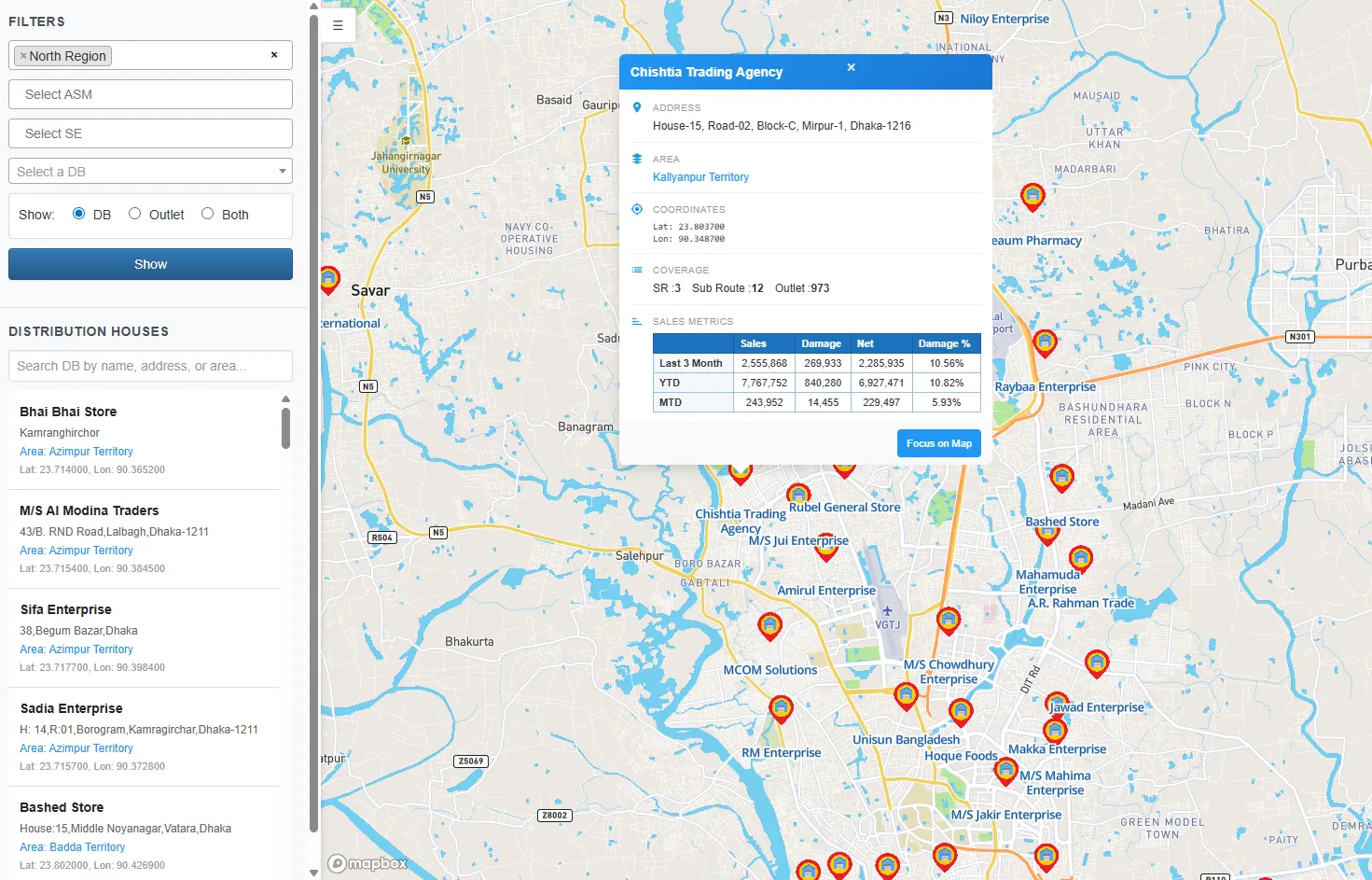
Insight & integrations
Plugs into what you already run.
Live dashboards out of the box. Two-way sync with your ERP. Report in the BI tools your leadership already reads.
 SAP
 Power BI
 Tableau
- ERP systems
Built with
 ASP.NET
 C#
 Python
 Flutter
 MySQL
 Azure
See it on your routes.
See SalesLead running on your own routes, outlets and distributors in a free demo.