Employee tracking

Employee tracking software for FMCG field teams

See your field team on a live map, replay any rep’s day outlet by outlet, and check every visit against the beat plan. Tracking runs on the same data as your orders, so you see the work, not just the movement.

Checked in09:42 · GPS verified
  • Live map of every field employee
  • Day replay, outlet by outlet
  • A list of who needs a call
  • Shelf photos tied to the outlet

Live map

See who is working, right now.

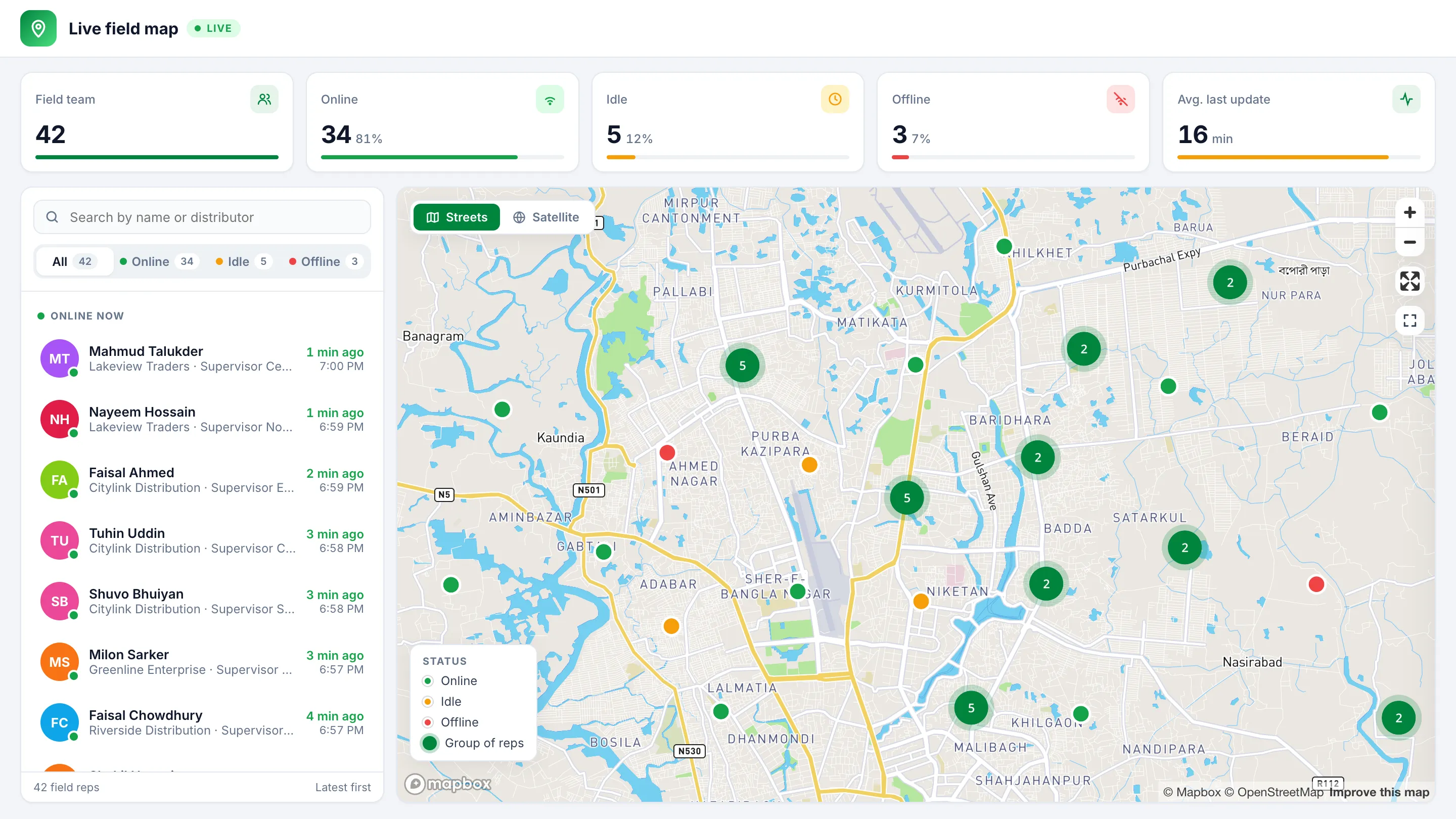
Every field employee on one map, with a count of who is online, idle or offline. Open a person to see when they last reported and what they have done today.

  • Filter by area, down to one person
  • Search for anyone by name
  • Street and satellite views
  • Updates on its own, with no reloading
SalesLead live field map of Dhaka with sample data: field reps on the map as online, idle or offline, with a count of each.

Real screens shown with sample data. Map © Mapbox © OpenStreetMap.

Day replay

Replay any rep’s day on the map.

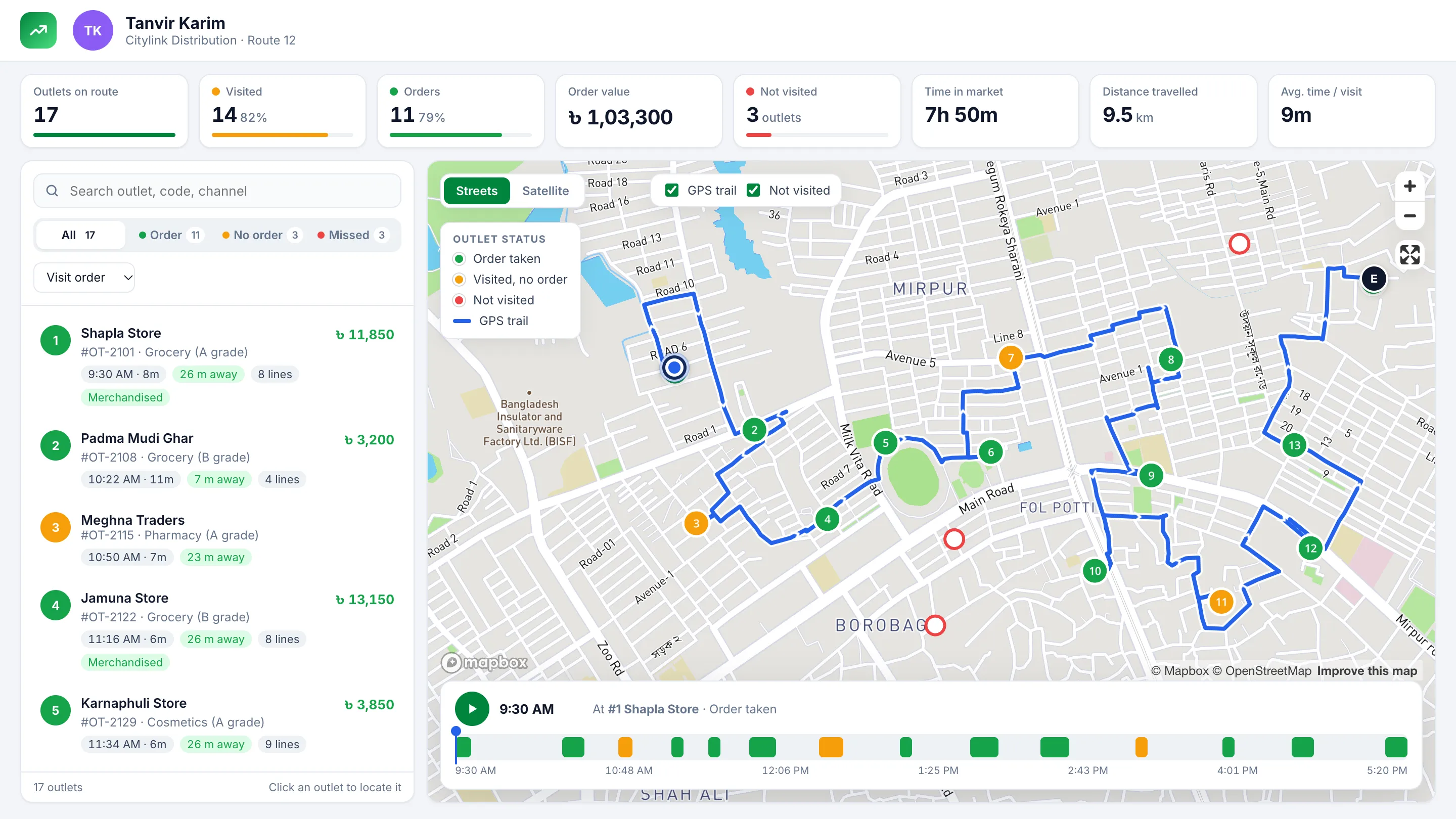
Pick a person and a date. The GPS trail plays the day back stop by stop, over the outlets on their beat.

  • Outlets marked as ordered, visited or not visited
  • Distance, time in the market and order value
  • Visits away from the outlet flagged for review
  • Export or print it for the weekly review
SalesLead day replay with sample data: one rep’s route across Dhaka with the outlets on it, and a timeline from 9:30 AM to 5:20 PM.

Real screens shown with sample data. Map © Mapbox © OpenStreetMap.

Working status

Spot a quiet team before the day is lost.

See field coverage and the online rate for each area, then the people who have been silent longest. Group it by area, supervisor or distributor.

Field coverage today

82%
  • Area 1
  • Area 2
  • Area 3
3 need a call

Proof from the outlet

See the shelf without going there.

Merchandisers check in with GPS and a selfie. Shelf photos are tied to the outlet and can be filtered by category.

Shelf photo11:20

Location matched
Tied to outlet

How it works

How tracking fits a working day

  1. 1

    Plan

    Beat plans and monthly itineraries set who should visit which outlets.

  2. 2

    Start

    Attendance starts the day, and the rep appears on the live map.

  3. 3

    Visit

    Each outlet visit is location-verified and time-stamped, with an order or a reason.

  4. 4

    Watch

    Managers see who is online, who has gone quiet and how coverage looks by area.

  5. 5

    Review

    Replay the day, see which outlets were missed, and act on it tomorrow.

What is employee tracking software?

Employee tracking software shows managers where field staff are and what they did during the working day. It replaces phone calls and paper reports with a location record from each employee’s phone.

For an FMCG company, location alone is not enough. A sales head needs to know whether the planned outlets were visited, whether they gave an order, and who needs help today. That is why SalesLead ties tracking to beat plans, visits and orders.

Everything inside SalesLead tracking 10 modules

Live view

  • Live field map

    Every field employee on one map, right now.

    • Online, idle and offline counts at a glance
    • When each person last reported
    • Filter by area, down to one person
    • Street and satellite views
  • Working status

    Spot a quiet team before the day is lost.

    • Who is online, offline or has no signal today
    • Field coverage and online rate by area
    • A list of who has been silent longest
    • Group by area, supervisor or distributor

Day review

  • Day replay

    Play back any rep’s day on the map.

    • GPS trail for any person and date
    • Outlets marked as ordered, visited or not visited
    • Distance travelled and time in the market
    • Filter to visits flagged for location
  • Outlet visit status

    Which outlets were visited, missed or still pending.

    • Planned against visited outlets for each rep
    • Drill down from a team to one outlet
    • An outlet-by-outlet log of the day
    • Order value against target
  • Login & working time

    When the working day really started and ended.

    • Login and logout times
    • First call and last productive call
    • Working time and time spent in outlets
    • Daily distance for each employee

Outlet proof

  • Merchandising

    See the shelf without going there.

    • Merchandiser attendance with GPS and selfie
    • Shelf photos, filtered by category
    • Outlet visits with their photos
    • Display and order details
  • Verified visits

    A visit counts when the location backs it up.

    • Location-verified check-in and check-out
    • Time stamps on every visit
    • Geo-tagged photos
    • Visits away from the outlet flagged

Supervisors & control

  • Supervisor & TSM tracking

    The people who check the field are measured too.

    • Supervisor itineraries
    • TSM visit performance by day or month
    • Work-with days with each rep
    • Beats covered, outlets per day and LPC
    • Visit reports and a supervisor dashboard
  • Devices & access

    Control who can log in, and from which phone.

    • Logins limited to approved phones
    • Roles set who can view, create, edit or delete
  • Export & print

    Take the day into your weekly review.

    • Excel exports of tracking reports
    • Print-ready views

Why SalesLead

Built for FMCG field teams, not delivery fleets

  • More than dots on a map

    A plain GPS tracker shows where a phone went. SalesLead shows that against the beat plan, the outlets and the orders.

  • Planned against actual

    Scheduled outlets sit next to visited ones, so a missed outlet shows up the same day.

  • Visits you can verify

    Location-verified check-ins with time stamps and geo-tagged photos. Visits away from the outlet are flagged.

  • Supervisors included

    Supervisor itineraries and visit reports sit beside their team’s figures.

  • Control who logs in

    Logins can be limited to approved phones, and roles decide who sees what.

  • One system, not another app

    Tracking shares its data with orders, stock and reports, so there is no second system to check against.

FAQ

Questions buyers ask

Can I see where my field team is right now?

Yes. The live map shows every field employee, when each person last reported, and how many are online, idle or offline. You can filter by area, down to one person.

Can I see where a rep went on a past day?

Yes. Pick a person and a date to see their GPS trail, the outlets on their beat and which of them were ordered from, visited or not visited. You can play the day back on the map.

How do I know a rep really visited an outlet?

Each visit has a location-verified check-in and check-out with time stamps, and reps can add geo-tagged photos. Visits recorded away from the outlet are flagged, and you can filter to just those.

What happens when a rep has no signal?

The live map shows when each person last reported, so a quiet phone is easy to spot. Orders can still be taken offline, and they sync when the rep is back in signal.

Can a rep log in on someone else’s phone?

Logins can be limited to approved phones, so a rep’s account only works on the device you allow.

Are supervisors and merchandisers tracked too?

Yes. Supervisors have their own itineraries, visit reports and dashboard. Merchandisers check in with GPS and a selfie, and their shelf photos are tied to the outlet.

Can tracking follow our company policy?

Yes. Location tagging is set by company policy, and roles decide who can see what.

Which companies use SalesLead in Bangladesh?

Published SalesLead customers include Dan Cake, Nabil Consumer Products and Dabur Bangladesh. Across its customers the platform has 658,646 retail outlets mapped, 1,504 distributors connected, 1,418 field reps on the app.

See your own field team on the map.

See SalesLead running on your own routes, outlets and distributors in a free demo.